Crowdgifts let your community contribute towards a larger goal by allowing multiple supporters to fund the same gift. Whether you're saving for a new phone, camera, computer, or another big purchase – Crowdgifts make it easy to track your progress and share your goal with your fans.

How to enable Crowdgifts
Crowdgifts are available to all users who have enabled Creatorflow cash gifting.
To enable Creatorflow, go to Settings > Payment Settings > Creatorflow
How to create a Crowdgift
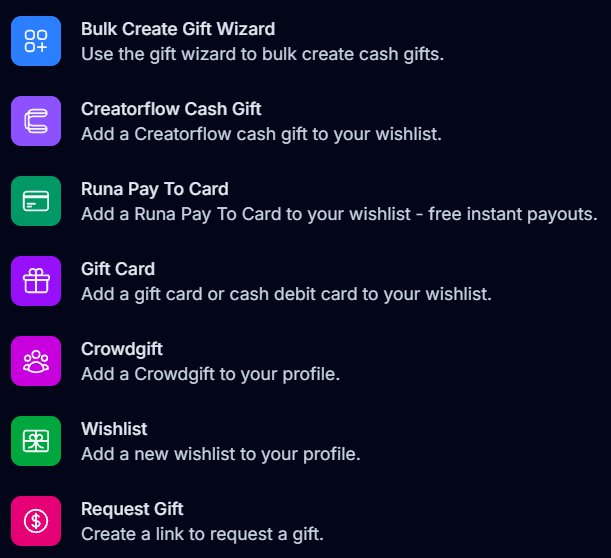
Once you have Creatorflow setup, you'll now be able to create a Crowdgift by clicking on the "Add Gift" button in the top menu and selecting "Crowdgift"
Add a title
Choose a title that clearly describes your fundraising goal.
Example: New iPhone
Set your funding goal
Enter the total amount you'd like to raise. Your supporters will be able to contribute toward this goal until it has been fully funded.
Example: $1,000
Choose a category
Select the category that best fits your gift.
Example: Technology
Add a description
Write a short description explaining what you're raising funds for. A clear and personal description helps supporters understand your goal.
Example: Help Sarah buy a brand-new iPhone
Upload an image
Add an image that represents your Crowdgift. You can upload your own image or choose one that best matches your goal.
Save Crowdgift
Once you've completed the details, click Save. Your Crowdgift will appear at the top of your YouPay wishlist, making it easy for your supporters to find.
Share Crowdgift
To maximize support:
- Open your Crowdgift.
- Click the "Generate Link"
- Copy your unique shareable link.
- Share it with your fans on social media, streaming platforms, or anywhere you connect with your community.
Why use Crowdgifts?
Crowdgifts are ideal for larger goals that may be difficult for a single supporter to fund on their own.
With Crowdgifts, you can:
- Raise funds for expensive items or projects.
- Track your progress toward your funding goal.
- Display your fundraising goal prominently at the top of your wishlist.
- Share a dedicated link directly to your Crowdgift.
- Let multiple supporters contribute until your goal is reached.
When will I get paid?
All individual contributions to a crowd fund are individual gifts. This means you get paid each contribution into your Creatorflow account as they happen. You do not have to wait for the Crowdgift to be completed to receive your payments. As Creatorflow is being used, you can withdraw each individual contribution instantly.
Can Crowdgifts be overpaid?
Yes – Crowdgifts can be overpaid, meaning you could be gifted more money than the total of the Crowdgift.
Are Crowdgifts protected with chargeback protection?
Yes, just like all gifts on YouPay, we offer chargeback protection on Crowdgifts.
Watch the tutorial
Prefer a walkthrough? Watch our step-by-step video guide to learn how to create a Crowdgift.
Was this article helpful?
That’s Great!
Thank you for your feedback
Sorry! We couldn't be helpful
Thank you for your feedback
Feedback sent
We appreciate your effort and will try to fix the article